How To Collect and Use Custom Visitor Data to Boost Engagement
By collecting custom visitor data, you can create personalized experiences that build trust, improve engagement and encourage repeat visits.
Want to engage your audience and deliver content that speaks to them? By collecting and using custom visitor data, you can tailor website interactions, boost engagement and create lasting connections.
In this article, we’ll explore how to gather visitor insights and use them to personalize experiences, no coding required.
Step 1: Start Collecting Visitor Data
Build Visitor Profiles Automatically
rnBy using PersonalizeWP, you'll automatically start tracking visitors from the moment they land on your site, gathering data such as:
- The time of their first visit
- The source they came from
- The first page they viewed
rnAs visitors interact with your site, their profiles grow richer.
Expand Profiles with Forms and Integrations
rnWith tools like WooCommerce, Gravity Forms, WS Form and Ninja Forms, you can take visitor profiles even further.
Form submissions and purchases provide key details, such as names, preferences, and locations, helping you segment your audience and serve relevant content.
Step 2: Build Detailed Visitor Profiles with Custom Fields
Add Unlimited Custom Profile Fields
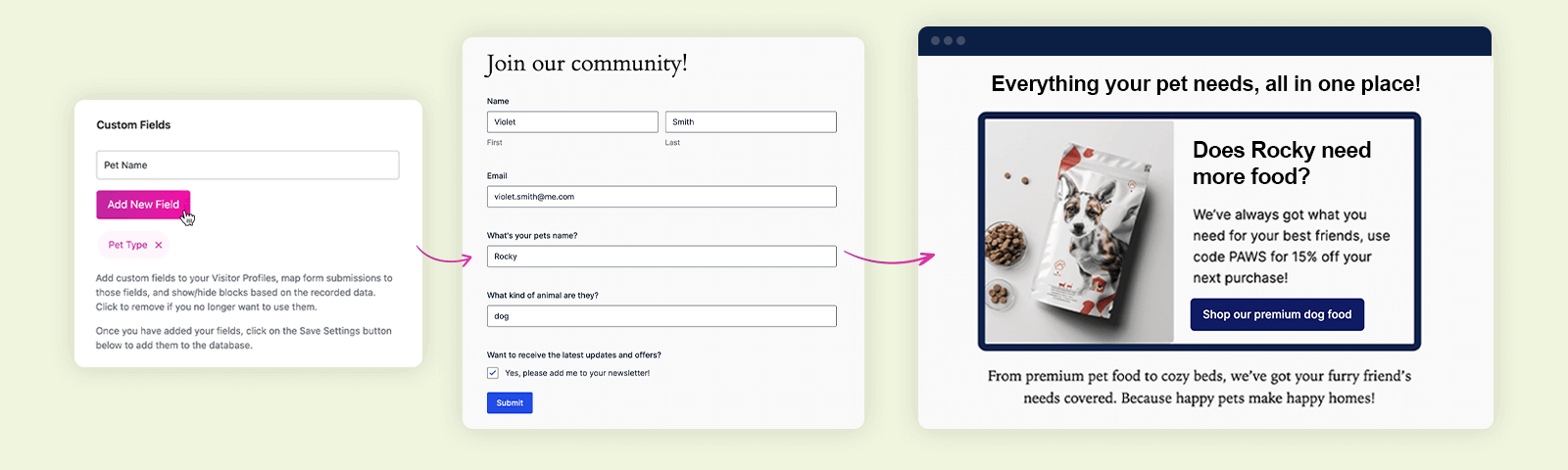
rnPersonalizeWP allows you to capture the specific data you need, whether it's event preferences, skill levels, or household info. This customization lets you create truly personalized experiences.
For example:
- Event Preferences: Tailor invites based on event types (e.g., webinars vs. workshops).
- Skill Level: Adapt content to match the visitor’s experience.
- Household Info: Offer content relevant to families or pet owners.
Seamlessly Collect and Use Data
rnCustom fields let you gather data through forms, then use it to display personalized content like event recommendations or location-based offers.
Step 3: Use Visitor Data to Personalize Content
Dynamic Content with Profile Data
rnOnce you’ve built visitor profiles, you can integrate their data into your content. By using the Personalize menu within the WordPress Block Editor, it’s easy to personalize content blocks.
For example, you can use the on-page toolbar to easily swap out:
- “Welcome back!” → “Welcome back, [First Name]!” to target returning visitors coming to your website.
- “Shop our latest products” → “Shop our latest deals on [Last Purchased Category]” to highlight more relevant items.
- “Sign up for our newsletter” → “[First Name], don’t miss exclusive updates on [Topic of Interest]!” to encourage sign-ups.
- “Explore our blog” → “Explore our latest articles on [Previously Viewed Category]” to target your visitors specific interests.
- “Check out our services” → “Looking for [Industry-Specific Service]? Here’s how we can help.” to provide more sector-specific information and encourage conversions.
rnBy using dynamic content, you can create a more engaging and personalized experience that keeps users coming back.
Step 4: Track Engagement and Refine Your Strategy
Real-Time Tracking
rnMonitor visitor actions in real time, what pages they visit, which forms they fill out, and what products they buy. This helps you identify what content resonates and refine your strategy for maximum engagement.
Privacy-Friendly Options
rnIf you prefer not to store personal data, you can keep profiles anonymous. This lets you still track user journeys and deliver personalized content without compromising privacy. You can also change your settings so that the data you collect expires after a certain period of time.
Unlock the Full Potential of Personalization
Using custom visitor data helps you transform your website into a dynamic, personalized experience. With PersonalizeWP, you can effortlessly collect insights, build detailed profiles, and deliver tailored content – all without coding.
Stop delivering generic content. Use PersonalizeWP to boost engagement, build trust and create meaningful connections.

Founder
As the founder of PersonalizeWP and the driving force behind the plugin, Paul is responsible for the overall direction and roadmap of PersonalizeWP. He believes in the power of personalisation to improve user experiences, and talks regularly about how personalization strategies can help businesses to increased conversion and drive revenue uplift.